Positions
In this article, we examine how Scalable Vector Graphics (SVG) represents the positions and sizes of objects within a drawing context, including the SVG coordinate system and what a "pixel" measurement means in a scalable context.
The grid
For all elements, SVG uses a coordinate system or grid system similar to the one used by canvas (and by a whole lot of other computer drawing routines). That is, the top-left corner of the document is considered the point (0,0), the point of origin. Positions are then measured in pixels from the top-left corner, with the positive x direction being left to right, and the positive y direction being top to bottom.
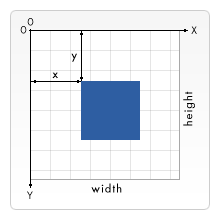
Note that this is slightly different than the way you're taught to graph as a kid (the y-axis is flipped). However, this is the same way elements in HTML are positioned.
Pixels, user units, and the SVG user coordinate system
SVG graphics are drawn using a user coordinate system, where positions and lengths are expressed in user units. User units are the unitless coordinate values you write in SVG attributes such as x, y, width, and height.
When an SVG viewport is first created, one user unit corresponds to one CSS pixel. This is only the initial mapping, however. Features such as the viewBox attribute can transform the user coordinate system so that one user unit corresponds to more or fewer CSS pixels.
SVG also supports absolute units such as cm, mm, and pt. These are resolved into the user coordinate system before rendering.
We'll start with an <svg> root element:
<svg width="200" height="200">…</svg>
The above element defines an SVG viewport that is 200 by 200 CSS pixels. Because no viewBox is specified, the initial mapping is used, so one user unit corresponds to one CSS pixel.
Let's add a viewBox attribute and render a square on the SVG viewport using a <rect> element:
<svg width="200" height="200" viewBox="0 0 100 100">
  <rect x="10" y="10" width="40" height="40" fill="royalblue" />
</svg>
The SVG viewport is still 200 by 200 CSS pixels in size, but the viewBox defines a coordinate system spanning from (0,0) to (100,100) in user units. The browser maps this 100 × 100 user-unit coordinate system to the 200 × 200 CSS pixel viewport, so each user unit is rendered using 2 × 2 CSS pixels.
The example renders like so:
The rectangle is positioned at (10,10) and is 40 × 40 user units in size inside the viewBox. However, because each user unit is rendered using 2 × 2 CSS pixels, the rectangle appears as an 80 × 80 CSS pixel square on the screen, 20 pixels from the left and top of the SVG edge.